Setting up the table
The account table (ACCOUNT TABLE – MODEL) appears only in modes with defined SL/TP levels.
This is a simulated account in USD, not a broker or exchange balance. It is based on trades from the loaded chart history.
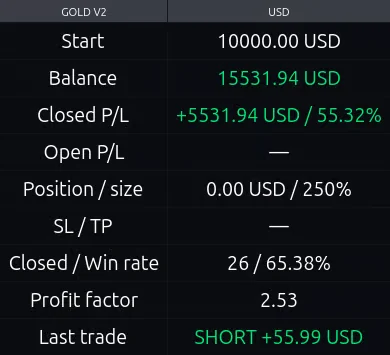
How to read the account table#
| Row | What it shows |
|---|---|
| Start | The initial amount from which the selected range is recalculated. |
| Balance | Initial amount + the result of closed trades in the selected range. |
| Closed P/L | Profit or loss of closed trades in USD and as a percentage of the initial amount. |
| Open P/L | Current model profit or loss of the open position. A dash means there is no open position. |
| Position / size | The calculated notional value of the open position in USD, based on the selected position size as a percentage of the model balance. |
| SL / TP | The stop and target prices of the active model trade. A dash means there is no open position. |
| Closed / Win rate | The number of closed trades in the selected range and the share of profitable ones among them. |
| Profit factor | Total cash profit / total cash losses, ignoring the minus sign. For example: 1.5 means 1.5 USD of profit per 1 USD of loss. This is not a win percentage. |
| Last trade | The direction and cash result of the last closed trade in the calculation of the selected range. |
The account table uses reinvestment – this means it compounds the result of closed trades in the selected range, rather than applying the specified position size to each trade.
By default, the table applies 2.5x leverage (250%). If you want to remove leverage, set "Position, % of model balance" to 100%.
The table automatically selects the most profitable range of recent closed trades within the defined limits. For example, out of the last 50, it may show the last 30. The selected range keeps all trades, including losses. An open trade does not affect the range selection.
Therefore, the win rate and return shown in the table refer to the selected range, not the strategy's entire history.
If there were no losses in the selected range, the profit factor (PF) may be shown as ∞. This only means there are no losses in that sample. When there are not enough closed trades, the table uses the available data instead of waiting for the number of trades to reach a required minimum.
ACCOUNT TABLE – MODEL settings#
"Start capital, USD"
The initial capital of the model account. 10,000 USD by default.
Changes the table's cash figures, not the entry points.
"Position, % of model balance"
The notional of the position relative to the model balance.
100% = 1x, 200% = 2x, 300% = 3x.
For example, with a balance of 10,000 USD, a value of 200% gives a position of 20,000 USD. This is the position size, not the risk to the stop.
Increasing the size increases both profit and loss.
Margin requirements, liquidation, funding, and swap are not modeled in this table.
"Minimum closed trades" (10 by default)
The minimum number of recent trades for comparing ranges. Allowed from 5 to 50.
"Maximum / fixed closed trades" (50 by default)
The maximum number of recent trades stored.
Allowed from 10 to 50.
To look at a fixed number of trades, set both parameters to the same value.
For example:
Minimum closed trades = 30
Maximum / fixed closed trades = 30
"Fee per side, % — legacy profiles"
The commission on entry and separately on exit, accounted for in Manual Settings, BTC+ETH, and GOLD V1 45s modes.
0.003% per side by default. This setting affects the table; it does not add spread and slippage modeling to these profiles.
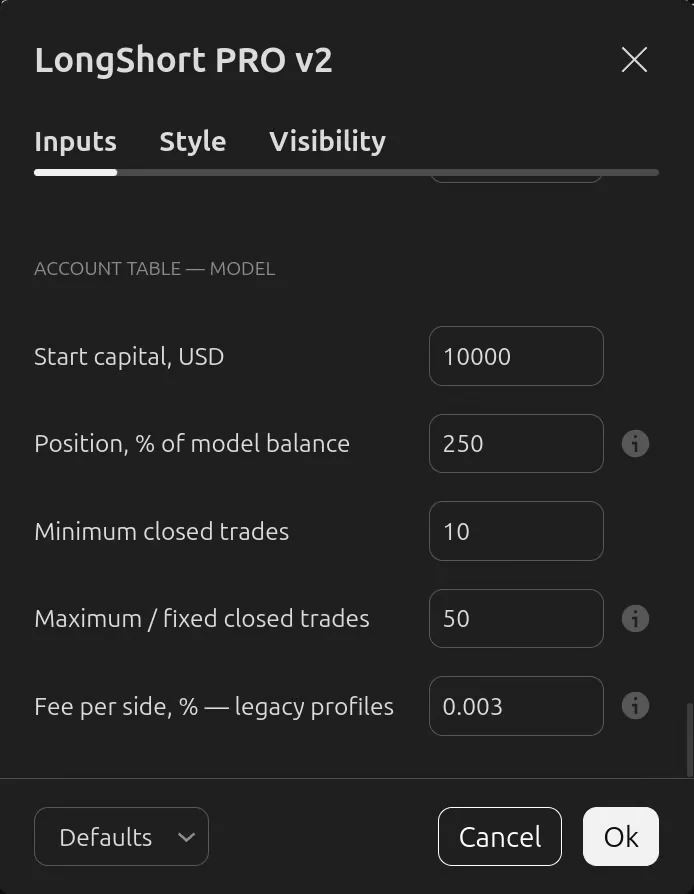
Position size and costs change the cash figures in the account table, but not the entry points. The table calculates a model account and does not model margin requirements, liquidation, funding, or swap.
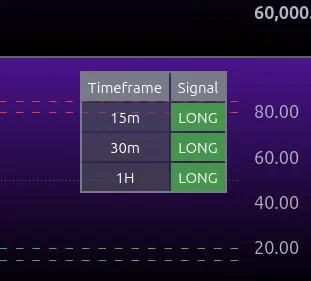
In Base mode, instead of the account table, a table is shown with the state of each tracked timeframe: LONG, SHORT, or WAIT.